In some proctored assessment processes, the organisation to which you are applying may request payment for the assessments you are required to complete. If payment is necessary for your assessment, this requirement will be explicitly stated in your email instructions.
To complete a requested payment:
- Log in to Testgrid using your username (email) and password
- Follow the instructions to Schedule your proctored assessment
- At the booking confirmation screen, follow the prompts to complete your payment using a credit/debit card
- Proceed to confirm your booking
How do I reschedule my proctored assessment?
In the event you need to change your scheduled assessment date and/or time due to unforeseen circumstances, you can do this via the Testgrid platform.
Please note the following conditions for rescheduling your assessment:
- For assessments with a 72-hour booking window, any new booking must be scheduled a minimum of 72 hours in advance.
- For all other assessments, your current booking must commence at least 24 hours from now.
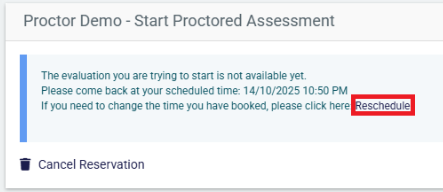
To reschedule your scheduled assessment date and/or time:
- Log in to your Testgrid account.
- Click the “Reschedule” link
- Select a new date and/or time for your assessment.
What if I’m late or miss my scheduled assessment time?
If you booked a proctored assessment and missed the time slot - or are more than 15 minutes late - please click on ‘Contact us’ (in the top right header of this page) to email a member of our support team as soon as you can or use the Help button in the bottom-right corner to start a live chat.
What am I allowed to bring into a proctored assessment?
Please refer to the original invitation email sent by Testgrid, as this will contain instructions and details regarding any permitted resources.
Getting help
Need more help? click on ‘Contact us’ (in the top right header of this page) to email a member of our support team for assistance or use the Help button in the bottom-right corner to start a live chat.